
I’m sure many pet owners can relate – I hate leaving my two dogs home alone. My partner and I both work from home. It doesn’t happen all that often, but I still worry about Kit and Fen when I’m not home to keep an eye on them. A few years ago I tried purchasing a pet camera. But it didn’t work very well, and I ended up returning it. I’ve thought about trying out other brands to see if I could find one that I like. I just never got around to trying any more – until now!
 This review is sponsored by CENGCEN. I received our pet-treat camera for free in return for our honest review. As always, I strive to share only products I feel would benefit my readers and their pets. All opinions expressed are my own. This post contains affiliate Amazon links. If you purchase products using one of my links I will receive a small commission at no additional cost to you.
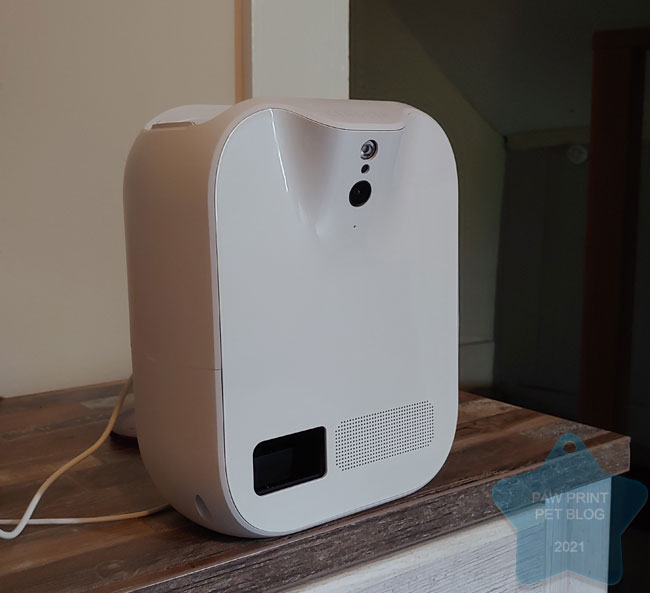
I was recently approached by a company called CENGCEN, who allowed me to try out their treat dispensing WiFi pet camera . I know pet cameras have come a long way since I last tried one out, and I was excited to try this one! CENGCEN’s camera app is compatible with both iOS and Android (what I use) phones. Their app connects to their pet camera through your WiFi and not only allows you to see your pet, but also to dispense treats, listen in on them, and talk to them too!
CENGCEN Pet Camera Features
The pet camera itself, arguably the most important feature, has an amazing 130* field of vision. The app allows you to scroll back and forth to take control of the full field of vision, so you can still see your pet even if he/she is relaxing near the edge of a room. You can activate the camera through the app anytime, and can also set your camera to auto record when it detects motion. If you see your pet doing something especially adorable, you can even use the app to remotely take pictures and record video footage!
The app has a button you can press to tell the camera to dispense treats. The camera makes a bell sound to alert your pet, then shoots treats out into the middle of the room. I used pieces of kibble rather than treats, and the camera dispensed a small handful of kibble out into the middle of the room, where my dogs could sniff around and forage for it.
The camera also features 2 way audio. You can use this feature to listen in on your pets, and also to talk to them through the camera! I especially love this feature. Kit and Fen can sometimes get a bit antsy when they think they’re home alone. Using the camera’s audio I can talk to, and comfort them, if they appear to be getting nervous without me there.
The camera comes with a wall mounting kit that doesn’t require you to drill into your wall – perfect for people, like me, who rent their home! It also works well just placed on a desk or table, out of your pet’s reach in case he/she decides to try to figure out how to get the treats out themselves. Another feature I love is that you can share your pet treat camera account with up to two additional users. This way I could allow my partner to monitor the camera from his phone too.
[AdsWithin]
Our Experience Using the CENGCEN Pet Camera
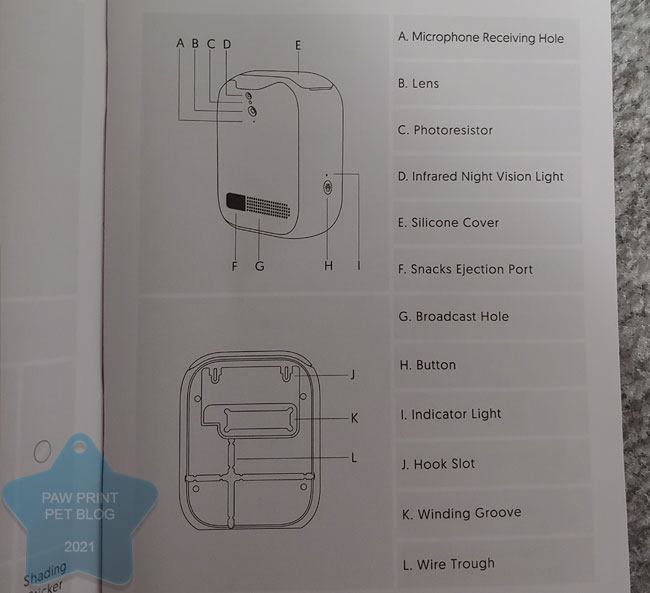 Downloading the app and setting up the camera was pretty easy. When you first set it up you’ll need to make an account and connect your camera to your WiFi network, so you will need to know your WiFi password. The instructions that come with the camera, along with the app, do a pretty good job at walking you through the setup process. The hardest part, for me, was figuring out where to get the app. I couldn’t find instructions for where to find it so I just ended up searching for “CENGCEN” in the app store and found it that way.
All the features the camera is supposed to have – 2 way audio, treat dispensing, 130* of vision – worked well for me! As you can imagine, Kitsune especially LOVES the treat dispensing feature. I was able to take both photos and videos remotely with this camera.
I found the app to be a little bit finicky at times. I’m unsure whether it was an issue with the app itself or my phone. A handful of times I’ve gotten error messages when I try to view the camera feed on my phone. However, the few times it happened I was able to fix it by restarting my phone. It makes me wonder if the issue could have something to do with my phone. Or, perhaps with my WiFi connection, which can be spotty at times.
I’m including our video review here too, for anyone who wants to take a look at what the app and the footage from the camera looks like!
So Do I Recommend the CENGCEN Pet Camera?
I’m really impressed with this camera! I will for sure continue to use it for my own pets. The CENGCEN pet treat camera currently retails new for $109.99 on Amazon. A bit expensive perhaps, but can you really put a price on piece of mind? If you’re interested in getting one for yourself, you can use the code CENGCEN1 to get 10% off your order until the end of next month, 9/30/2021.
Comment below! Have you ever tried using a pet camera to keep an eye on your pet while you’re away?
Recent Posts
Happy Halloween! Halloween should be a fun and exciting time for people and pets alike! However, it's important to remember that while we may enjoy the spooky atmosphere and seasonal treats, some...
While domestic mice and rats can make good pets, nobody enjoys having wild mice and/or rats living inside their home. They steal our food, can spread fleas and disease, and leave their droppings all...